




New Wave of SMS Phishing Targets Crypto Wallet Users
New Wave of SMS Phishing Targets Crypto Wallet Users — Scammers Impersonate Binance and Ledger
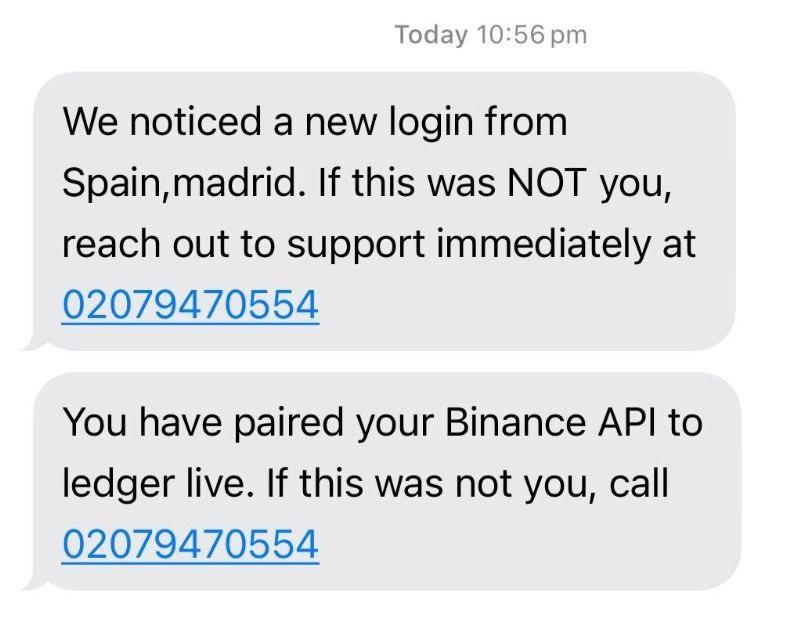
Cryptocurrency wallet users have started reporting a massive wave of suspicious SMS messages that appear to come from Binance or Ledger.
These texts warn recipients about alleged “suspicious activity”, such as the connection of a new device or a Ledger Live synchronization attempt, urging them to call a provided phone number to “protect” their account.
Fake SMS Messages Look Almost Identical to Real Ones
Security experts warn that these phishing SMS messages look extremely convincing — they use authentic templates, identical sender IDs, and even real numbers previously used by legitimate platforms.
In some cases, these fake messages appear in the same chat thread as genuine notifications from Binance or Ledger, making them particularly deceptive and difficult to identify.
Binance Responds — Anti-Phishing Code for SMS Introduced
Leading cryptocurrency exchange Binance has responded to the phishing campaign by expanding the use of its anti-phishing code for SMS notifications.
This feature helps users easily distinguish official messages from fraudulent ones.
The platform’s representatives strongly advise users to:
- Avoid calling any phone numbers mentioned in suspicious messages;
- Verify notifications only through the official Binance app or website;
- Report any suspicious activity directly to Binance Support.
Cybercriminals Exploit Social Engineering to Steal Crypto
Cybersecurity experts emphasize that scammers are deploying increasingly sophisticated social engineering tactics to steal users’ crypto assets.
They exploit trust in well-known brands like Binance, Ledger, and other crypto wallet providers to trick users into revealing sensitive data or making unsafe actions.
To stay safe, crypto holders are urged to remain extremely cautious when receiving any messages that include links, phone numbers, or identity verification requests.
How to Protect Yourself from SMS Phishing
- Never click links or call phone numbers from unsolicited messages.
- Always verify notifications using official apps and websites.
- Enable two-factor authentication (2FA) and use anti-phishing codes where available.
- Report any suspicious communications to your platform’s support team.